App Store Optimization for Mac
Know where your app ranks. In every country.
LocalASO researches keywords in 50+ App Store storefronts, in each local language, and optimizes your listing for every one of them. It runs on your Mac and your data stays there.
One-time payment. 1 Mac. The download is free; the app needs a license key to run.
- UScalorie counter
- DEkalorienzähler
- JPカロリー計算
- FRcompteur calories
- EScontador de calorías
- NLcalorieën tellen
- ITconta calorie
- KR칼로리 계산기
- BRcontador de calorias
- SEkaloriräknare
Features
Everything for keyword research and listing work
01
Ranks, volume and difficulty in 50+ countries
Pick keywords, pick storefronts, and see where an app ranks in each one: #1 to #200, or 200+ when it is not found. Volume and difficulty come with every cell, as clearly labelled estimates.
- 52 App Store storefronts
- Live checks against Apple's public search
- Estimates from rating counts, not invented search numbers


02
Keywords in the local language
A literal translation is not what people type. LocalASO adapts every keyword into the phrase locals actually search in each country, then checks that phrase in that country's store.
- Calorie counter becomes kalorienzähler in Germany
- Every local phrase is cached, never translated twice
- Or just add English only


03
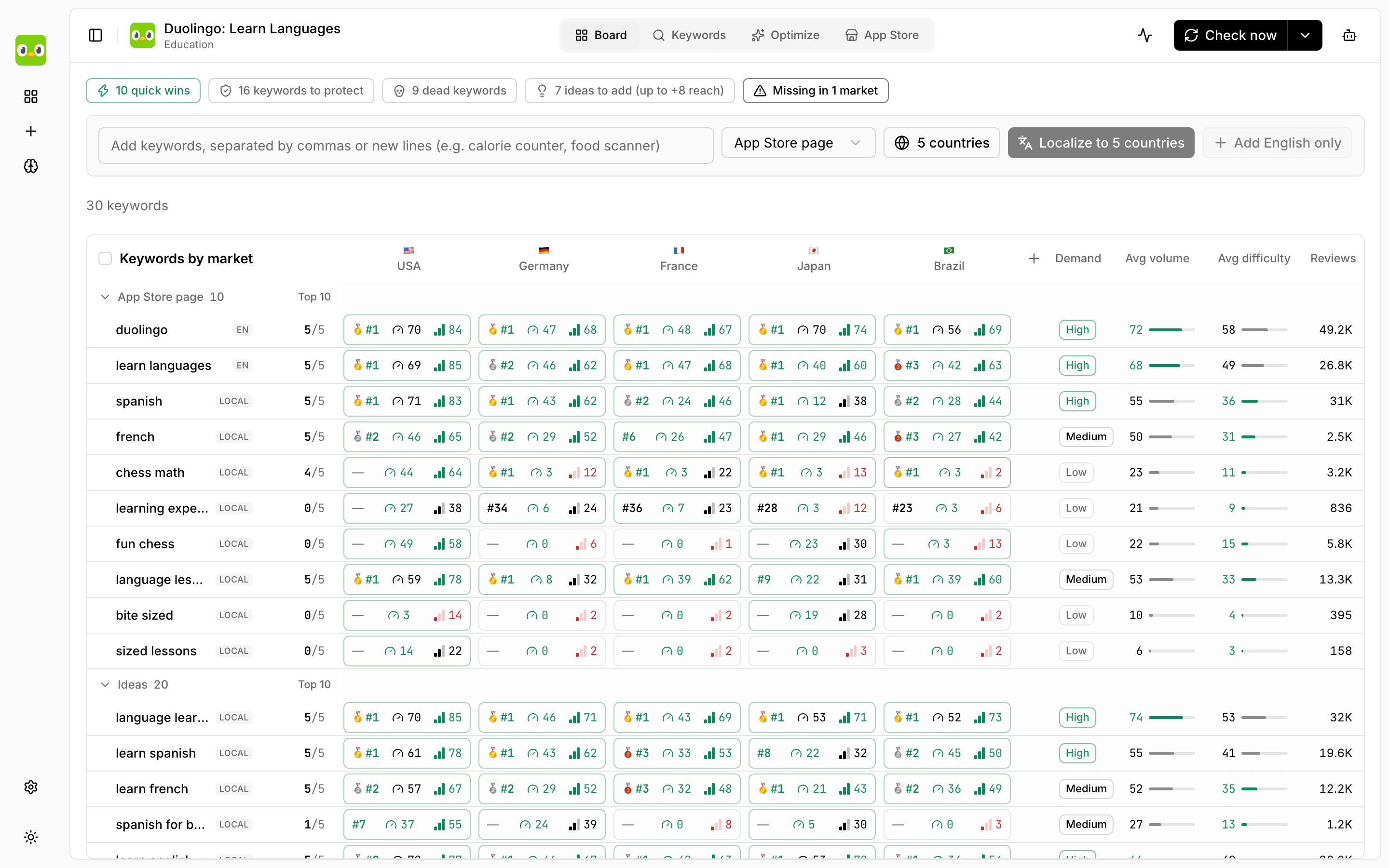
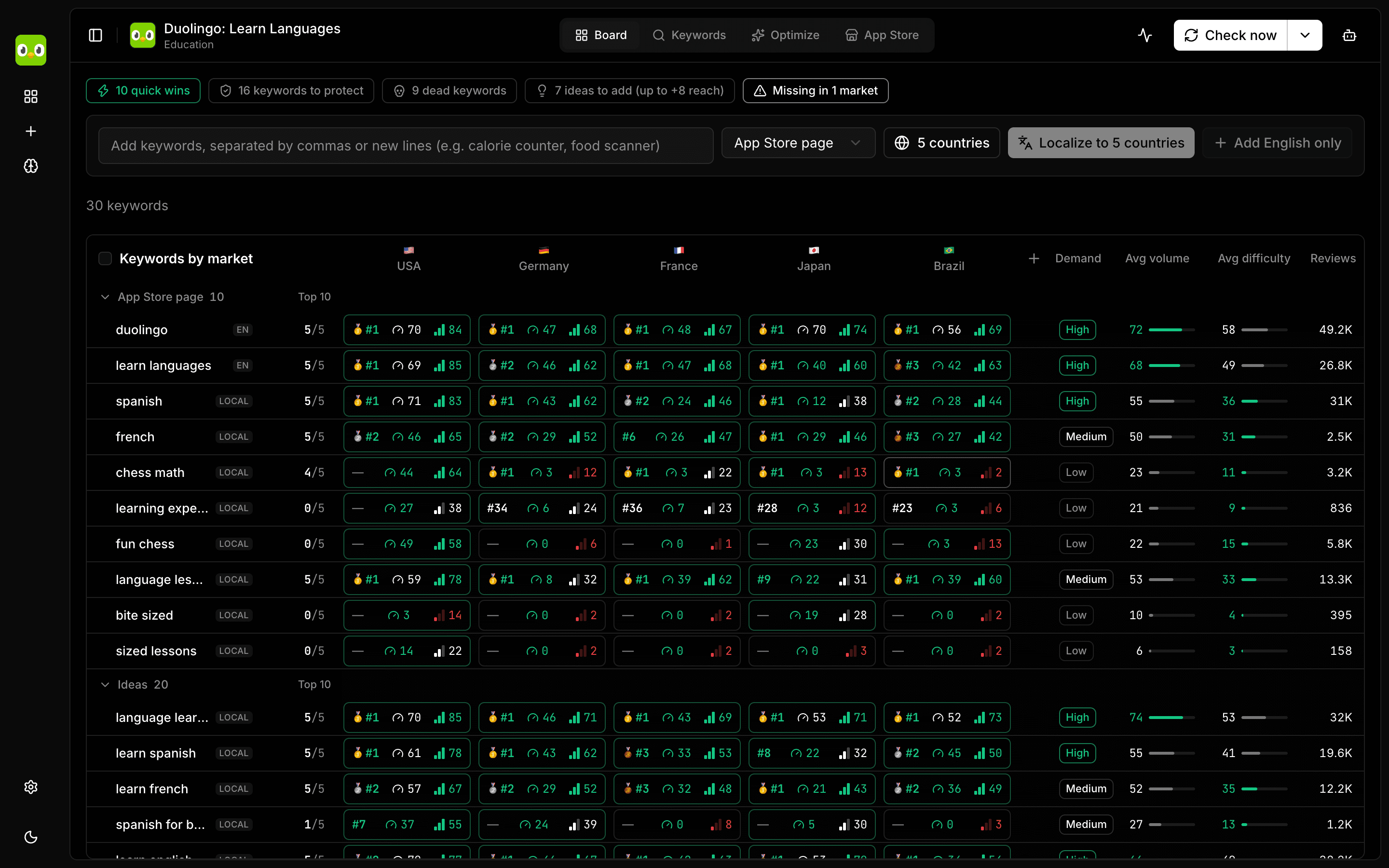
A board that reads like a watchlist
Every keyword is a row, every country a column. Medals for the top 3, a verdict per keyword (Push, Maybe, Dead, Swap, Hard) and a daily rank history, so you see what moved.
04
Optimize name, subtitle and keyword field
For every language of your app, LocalASO finds local candidate phrases, checks them and packs the 30-character name, 30-character subtitle and 100-character keyword field. Compare reach and difficulty of current versus proposed, with a reason for each change.
- Three strategies: Max reach, Win top 3, Keep brand
- Promo text, description and what's new per language
- Export to JSON and Markdown


05
Listing texts, per language
Read every localization of your listing in one place and improve promo text, description and what's new with AI, language by language.


06
Track competitors and see who you are losing to
Add any app as a competitor. A Losing to list shows who ranks ahead of you for each keyword, with their review counts and how many places ahead they are.


07
Suggestions with a reason
Keywords to add, remove or swap, quick wins, positions to protect and markets you are missing. Each suggestion explains why and applies in one click.


08
Brainstorm from one sentence
Describe your niche, for example a calorie tracker for people on keto. The AI proposes keywords, then LocalASO checks demand and difficulty in the countries you select.
09
An AI agent that shows its steps
Chat with your board: find 10 more long-tail keywords, hide the ones nobody searches, check Germany and Japan. You see each step live, with checkmarks, and a result table at the end.


10
MCP server for your own AI tools
LocalASO ships a local MCP server. Claude Code, Cursor, Codex or any stdio client can read your board, add keywords, run checks and read your listing.
- board_get, board_add_keywords, keywords_check, competitors_get, listing_get
- Same local database as the app


11
Upload to App Store Connect as a draft
Optional. Connect your own API key, review an old-versus-new diff per language, then upload. LocalASO writes only to an editable version and never submits for review.
12
Runs locally. Your data stays on your Mac.
No account, no cloud sync, no tracking. Everything lives in a SQLite database on your computer. The only network calls go to Apple, the AI provider you choose, and our license server.


How it works
Three steps
01
Add your app
Paste an App Store link, an ID or a name. LocalASO reads the public listing and derives your current keywords.
02
Check the markets
Localize keywords, check ranks, volume and difficulty across storefronts, and let suggestions point to quick wins.
03
Optimize and upload
Get a better name, subtitle and keyword field per language, then upload them as a draft when you are happy.
Pricing
Pay once. Use it forever.
No subscription, no per-keyword limits, no AI credits to run out. You bring the AI you already use.Pricing details
One-time payment
$29USD, once
- Lifetime license for 1 Mac
- All updates included
- Keyword research in 50+ storefronts
- Optimize listings per language
- AI agent and MCP server
- App Store Connect draft upload
- Move to a new Mac: 3 deactivations per 12 months
Download is free; the app needs a license key to run.
FAQ
Common questions
What do volume and difficulty mean?
Both are estimates on a 0 to 100 scale. Apple does not publish how often people search a word, so no tool can show real search counts. LocalASO looks at the apps that rank for a phrase and uses their rating counts: popular apps with many ratings suggest a phrase people really search (volume), and a top 10 full of apps with huge rating counts means it is hard to get in (difficulty).
Use the numbers to compare keywords with each other, not as exact traffic. The formulas are in the docs under Keyword research.
Do I need App Store Connect?
No, not for research. LocalASO reads the public listing of any app. You only need an App Store Connect API key if you want LocalASO to read the real keyword field of your own app, or to upload new texts.
Will it change my App Store page?
Only when you click Upload, and only as a draft. LocalASO writes into an editable version (or creates the next one) and never submits it for review. You check the draft in App Store Connect and submit it yourself.
Which AI can I use?
Claude Code, an Anthropic API key, Ollama (runs offline on your Mac), Codex CLI or Gemini CLI. You bring your own, and no AI credits are included in the license.
How many computers can I use?
One Mac per license. To move to another Mac, deactivate the old one in the license portal (up to 3 times in 12 months) and activate on the new one.
Do you offer refunds?
No. All sales are final. The download is free, but the app needs a license key to run, so please read the docs first and ask us anything before you buy. Details on the refund page.